
AJ Audio - a Jellyfin Music Player
Using Remote Play
From version 2.0.7 onward, AJ Audio supports controlling your other Jellyfin enabled devices, allowing you to control playback remotely.
Switching devices
To remote control another Jellyfin enabled device, simply click the newly-added Speaker icon next to Mute:
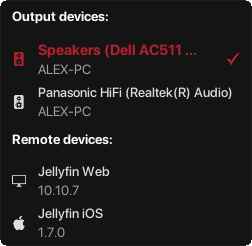
Here, you can also select which Output device to use. If you choose to control a remote device, your playback with AJ Audio will pause until you choose to control AJ Audio again. When controlling remote devices, the same functions are still available. You can navigate through the playlist, view lyrics etc. as normal.
Transferring to AJ Audio
When playing through a remote device, you can select the "Transfer to AJ Audio" option to make the song play at its current position on the app, which will then pause the playback on the remote device. This option is only shown when controlling a remote device in the first place.
Notes
You must be connected to Jellyfin in order for this to work. Offline mode will automatically disable remote connections. Some options in the Settings menu will be greyed out when remote controlling another device. Only devices which support audio streaming and are controllable will be shown.
Leave a comment
Log in with itch.io to leave a comment.