
AJ Audio - a Jellyfin Music Player
Using Folders in AJ Audio
As of version 2.0.6 onwards, AJ Audio supports creating custom folders for your music.
Creating a new folder
Simply click the "Create" button to create a new folder. Here, you can set a name and content type
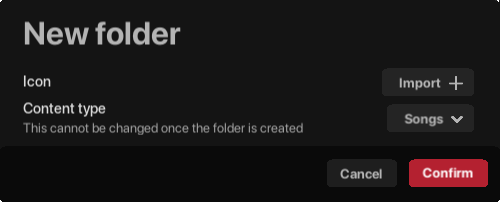
(New folder window)
Content types
When creating a folder, you can assign it a content type. This can only be set when creating the folder, and cannot be modified afterwards.
Songs
The layout for a folder with the content type Songs will be identical to the current "Songs" page that you use regularly. Here, songs are in a list view with customisable columns, which can be resized, moved, and new columns can be added or removed. You can sort any column by ascending or descending order.
Albums
This layout is identical to the current "Albums" page, where all albums are laid out in a grid format by default. You can toggle the view at any time to make it a list or grid view.
Artists
This layout is identical to the current "Artists" page, where all artists are laid out in a grid format by default. Just like the album content type, you can toggle the view between a list or grid view.
Playlists
This brand new layout is identical to the "Albums page", where items are laid out in a grid format. This can also be toggled between a list of grid view.
Various
This layout is identical to the traditional "Favourites" or "Recently Added" pages. You can add albums, songs, playlists, artists, or radio stations to this view.
Changes to app folders
The default app folders (Recently Added, Songs, Artists, Albums, Favourites, Radio, Playlists, Genres) can be renamed or hidden. This is very useful for those who want their own folders in favour of the default ones.
Adding content to your new folders
Simply drag the item to the folder in your Library to add content. You can also right-click on any item and select "Add to" to bring up a list of applicable folders (and Playlists) for you to choose from
Choosing a folder icon
You can import any .png, .jpg, .jpeg, or .bmp image to use as the icon for your new folder. This image should be square, and will be resized & copied over to your profile data for future loading.
Rationale
Folders are a great way to consolidate your music. Let's say you have a library of 100,000 tracks, but only 10% of which you listen to regularly. You can simply hide the original app folders and create your own in place of them
Folders are unique to AJ Audio and cannot be accessed via third party apps. If you have any queries or feature requests, please let me know.
Leave a comment
Log in with itch.io to leave a comment.